Engaging Students in a Virtual Classroom
The biggest challenge in online teaching is not technology — it is engagement. Without physical presence, the natural energy of a classroom disappears. Students can mute themselves, turn off cameras, or simply drift away mentally while appearing to be present.
Keeping students engaged online requires deliberate, consistent effort.
✓Why engagement is harder online
- Students are sitting alone — without the social energy of a physical classroom
- Distractions are one click away — social media, notifications, other browser tabs
- Screen fatigue is real — staring at a screen for long periods is mentally tiring
- Non-verbal communication is reduced — teachers cannot read body language as easily
- Technical issues interrupt flow and break concentration
Core principles of online engagement
Interaction every 3–5 minutes
In a physical classroom, a lesson can sustain longer stretches of teacher-led input. Online, students disengage within minutes without interaction.
Rule of thumb: If a student has not been actively involved in the last 5 minutes, they have probably mentally left the lesson.
Interaction techniques: - Ask questions frequently — cold call gently and consistently - Use polls and quizzes — quick, anonymous, low-stakes - Use chat box responses — "Type your answer in the chat" - Breakout rooms — small group tasks bring back pair and group work dynamics
Camera on policy
Encourage — or require — students to keep cameras on during lessons. - Students with cameras on participate more and focus better - You can read engagement levels and adjust accordingly - Be sensitive to genuine technical or privacy concerns
Vary activity types
Online lessons that rely too heavily on one format — slides and talking — lose students quickly. Variety keeps attention:
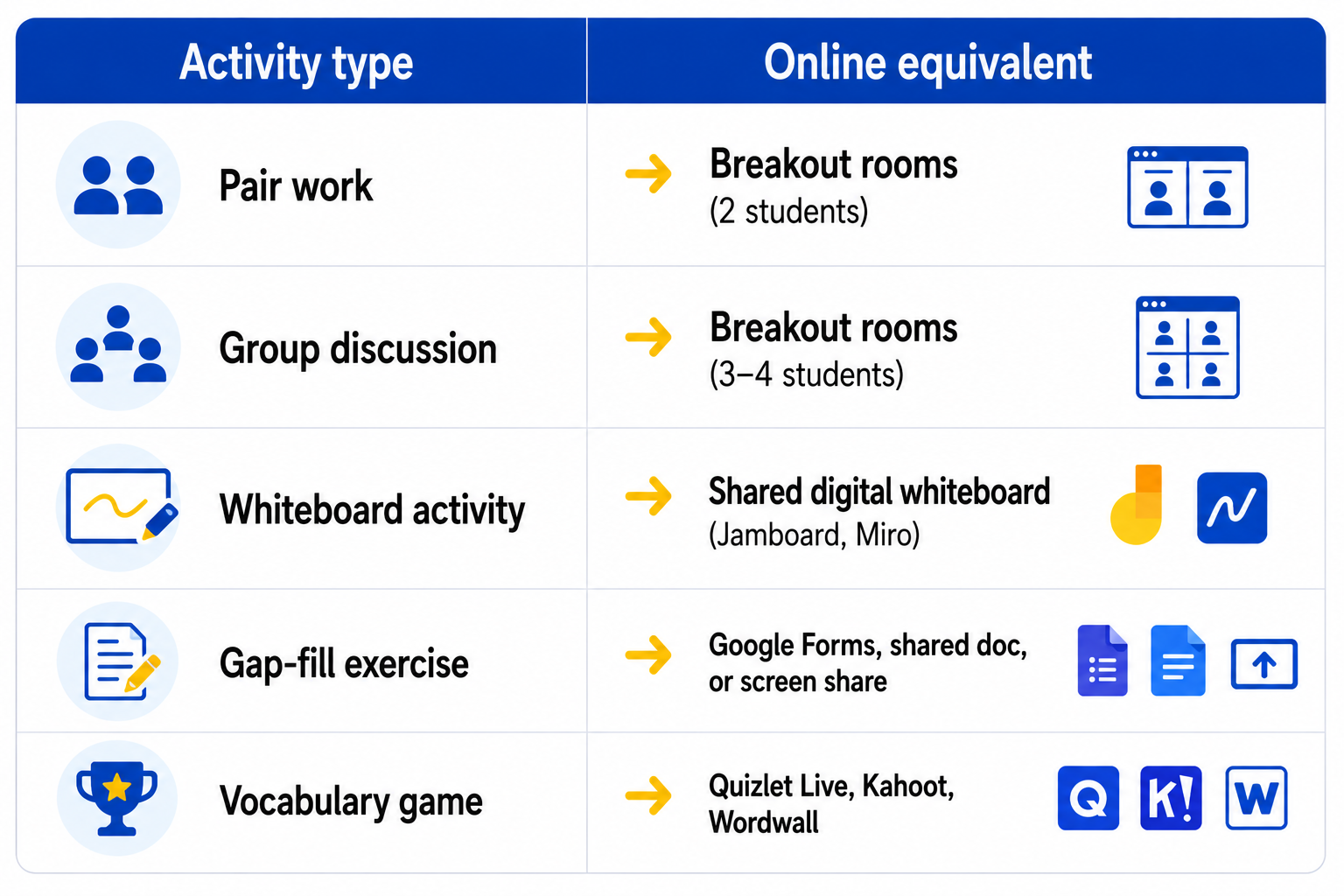
Use names constantly
In a physical classroom, eye contact signals who you are speaking to. Online, always use names. - "Maria, what do you think about...?" - "Good answer, James. Paulo — do you agree?"
Using names maintains personal connection and keeps all students alert.
Give clear, precise instructions
In a physical classroom, you can demonstrate and check understanding through body language. Online, unclear instructions cause confusion and lost time. - Give instructions in short, numbered steps - Write key instructions in the chat as backup - Check understanding before starting: "Can everyone see the document? Give me a thumbs up."
✓Managing the online classroom
- Latecomers — have a clear routine. Send the link, start on time, allow late joiners to settle silently.
- Technical problems — stay calm, have a backup plan, use the chat to communicate while problems are resolved
- Silent students — use the chat, polls, and direct questions to bring quieter students in
- Screen sharing — always check students can see your screen before continuing
✓Key takeaway:
- Explain why student engagement is more challenging in online teaching
- Apply at least three strategies to maintain active student engagement online
- Manage common online classroom challenges effectively